Using Regular Expressions in ABAP
Comprehensive guide to using regular expressions in ABAP, featuring practical examples, validation techniques, extraction methods, and tips for leveraging CL_ABAP_REGEX and CL_ABAP_MATCHER for efficient string manipulation in SAP environments.

Regular expressions (regex) are a powerful tool used to search, match, and manipulate strings in programming. They are widely used for tasks like validation, parsing, and transformation of text data. In ABAP, regular expressions are supported natively for certain string operations, making it easier to work with complex text patterns.
Regular Expressions in ABAP
In ABAP, the easiest way to work with regex is still the built-in FIND and REPLACE statements. They are concise, readable, and often all you need.
Example of FIND:
The FIND statement can be used to search for occurrences of a regular expression in a string:
1
2
3

FIND ALL OCCURRENCES OF REGEX lv_regexp
  IN lv_field
  SUBMATCHES lv_sub1 lv_sub2.
Here:
-
lv_regexpis the regex pattern. -
lv_fieldis the input string. -
SUBMATCHEScaptures groups intolv_sub1andlv_sub2.
Example of REPLACE:
The REPLACE statement is used to replace occurrences of a regular expression in a string:
1
2
3

REPLACE ALL OCCURRENCES OF REGEX lv_regexp
  IN lv_input
  WITH lv_replacement.
In this case:
-
lv_regexpis the regex to match. -
lv_inputis the string to modify. -
lv_replacementis the replacement text.
ABAP 6.40 and Later: CL_ABAP_REGEX and CL_ABAP_MATCHER
For advanced scenarios, ABAP also provides CL_ABAP_REGEX and CL_ABAP_MATCHER. This object-oriented approach is useful when you need reusable matcher objects or finer control over matching behavior.
Here’s an example of how you can use these classes:
1
2
3
4
5
6
7
8
9
10
11
12
13
14
15
16
17
18
19

DATA:  lv_value TYPE string VALUE '1234567890'.

DATA:  lo_regexp  TYPE REF TO cl_abap_regex,
       lo_matcher TYPE REF TO cl_abap_matcher.

CREATE OBJECT lo_regexp
  EXPORTING
    pattern     = '[A-Z]'   " Regex pattern to match uppercase letters
    ignore_case = abap_true. " Case-insensitive matching

lo_matcher = lo_regexp->create_matcher( text = lv_value ).

IF lo_matcher->match( ) EQ abap_true.
  WRITE:/ 'It's a match'.

ELSE.
  WRITE:/ 'Not a match'.

ENDIF.
Key Points:
-
CL_ABAP_REGEX: holds the regex definition and options. -
CL_ABAP_MATCHER: executes matching against a given text.
In this example, the regex "[A-Z]" searches for uppercase letters in '1234567890'. There are no uppercase letters, so the result is 'Not a match'.
Key Concepts of Regular Expressions
Here are a few core concepts and examples of regular expressions you can use in ABAP:
-
Character classes:
-
[A-Za-z]– Matches any uppercase or lowercase letter. -
\d– Matches any digit (equivalent to[0-9]). -
\w– Matches any word character (letters, digits, and underscores). -
\s– Matches any whitespace character (spaces, tabs, etc.).
-
-
Quantifiers:
-
*– Matches 0 or more occurrences of the preceding element. -
+– Matches 1 or more occurrences of the preceding element. -
{n}– Matches exactlynoccurrences of the preceding element. -
{n,}– Matchesnor more occurrences of the preceding element. -
{n,m}– Matches betweennandmoccurrences of the preceding element.
-
-
Anchors:
-
^– Anchors the match to the start of the string. -
$– Anchors the match to the end of the string.
-
-
Grouping and Alternation:
-
()– Groups expressions together to apply quantifiers or to capture parts of the match. -
|– Acts as an OR operator. For example,(abc|def)will match eitherabcordef.
-
Testing Regular Expressions in ABAP
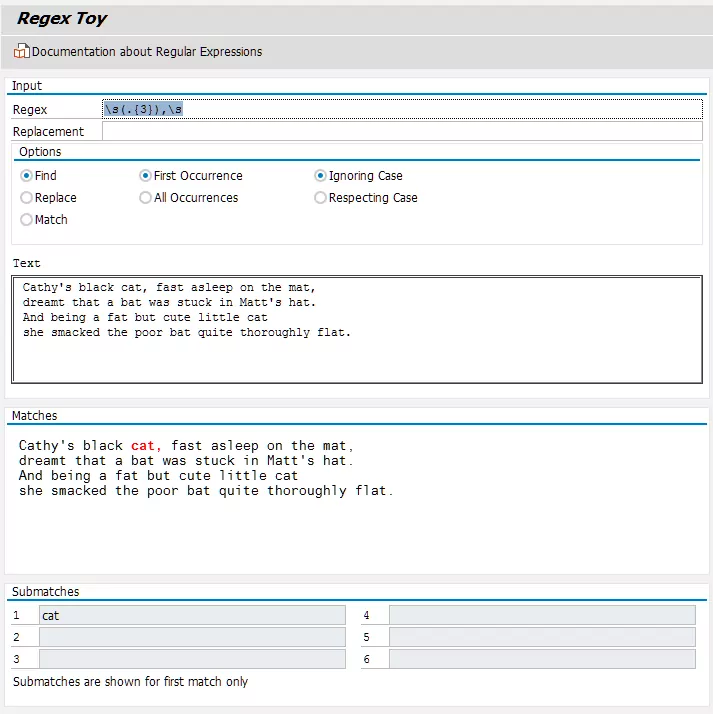
You can test patterns quickly with SAP’s demo program DEMO_REGEX_TOY. It is an easy way to validate matching behavior and captured groups before using a pattern in productive code.
Use it for rapid trial and error, then verify the final pattern in a small ABAP unit or report snippet.
Practical Use Cases for Regular Expressions in ABAP
-
Validating Input: You can validate user input, for example email addresses.
1
2
3
4
5
6
7
8
9
10
11
12
13
14
15
16

DATA: lv_email TYPE string VALUE 'test@example.com',
      lo_regexp TYPE REF TO cl_abap_regex,
      lo_matcher TYPE REF TO cl_abap_matcher.

CREATE OBJECT lo_regexp
  EXPORTING
    pattern = '^[A-Za-z0-9._%+-]+@[A-Za-z0-9.-]+\.[A-Za-z]{2,}$' " Email regex
    ignore_case = abap_true.

lo_matcher = lo_regexp->create_matcher( text = lv_email ).

IF lo_matcher->match( ) EQ abap_true.
  WRITE:/ 'Valid email address'.
ELSE.
  WRITE:/ 'Invalid email address'.
ENDIF.
Extracting Information: You can extract parts of strings, for example IDs, phone numbers, or structured tokens in log messages.
Replacing Patterns: Regex helps clean up or transform data, such as replacing spaces, masking sensitive values, or normalizing text.
2026 Update: Practical Patterns and Tips
Below are practical snippets that are useful in day-to-day ABAP development.
1. Extract email local part and domain
1
2
3
4
5
6
7
8
9

DATA(lv_email) = 'user.name+tag@example.co.uk'.
DATA(lv_user)  TYPE string.
DATA(lv_domain) TYPE string.

FIND REGEX '^([^@]+)@(.+)$' IN lv_email SUBMATCHES lv_user lv_domain.
IF sy-subrc = 0.
  " lv_user = 'user.name+tag', lv_domain = 'example.co.uk'
  WRITE: / 'user =', lv_user, 'domain =', lv_domain.
ENDIF.
2. Strip HTML tags (quick cleanup)
1
2
3

DATA(lv_html) = '<p>Hello <b>world</b></p>'.
REPLACE ALL OCCURRENCES OF REGEX '<[^>]+>' IN lv_html WITH ''.
" lv_html now 'Hello world'
3. Mask a card-like number with backreferences
1
2
3

DATA(lv_cc) = '4111222233334444'.
REPLACE ALL OCCURRENCES OF REGEX '(\d{4})\d{8}(\d{4})' IN lv_cc WITH '\1********\2'.
" lv_cc becomes '4111********4444'
4. Find multiple occurrences and inspect groups
FIND ALL OCCURRENCES OF REGEX and SUBMATCHES are often enough. Use CL_ABAP_REGEX and CL_ABAP_MATCHER when you need advanced control such as repeated matcher operations.
5. Testing and tooling
- Use SAP’s
DEMO_REGEX_TOYto experiment interactively inside your system. - During development, you can validate ideas in external tools like regex101, then confirm behavior in ABAP.
6. Performance and safety
- Avoid overly broad
.*patterns when you can use more specific character classes; greedy patterns can cause performance issues on long strings. - Escape regex-special characters (dot, plus, parentheses, etc.) as needed. In ABAP string literals, backslashes are literal, so write
\dand\sdirectly (you do not need to double-escape the backslash itself). Be mindful when embedding ABAP in other contexts or editors that may change escaping rules. - Prefer
REPLACEandFINDfor simple operations because they are concise and easy to maintain.
7. What does not work (and what does) in ABAP regex
One important update: ABAP regex behavior depends on the engine and release. The notes below were verified against ABAP release 7.58 documentation.
- Classic
REGEXuses POSIX-style behavior (leftmost-longest) and is marked obsolete in modern ABAP docs. - In modern ABAP releases,
PCREis available and recommended for advanced patterns.
Supported in classic REGEX: lookahead
These are supported and documented in ABAP search patterns:
1
2
3
4
5
6
7

DATA(text) = 'foo1 foo2'.

" Positive lookahead: match 'foo' only if followed by '1'
FIND ALL OCCURRENCES OF REGEX 'foo(?=1)' IN text.

" Negative lookahead: match 'foo' only if NOT followed by '1'
FIND ALL OCCURRENCES OF REGEX 'foo(?!1)' IN text.
Not available in classic REGEX: lookbehind
The common Perl-style lookbehind constructs are typical examples that do not work in the old engine:
1
2
3
4
5

DATA(text) = 'foobar'.

" Usually invalid in classic REGEX (POSIX-style)
FIND REGEX '(?<=foo)bar' IN text.
FIND REGEX '(?<!foo)bar' IN text.
If your system supports PCRE, use:
1
2

DATA(text) = 'foobar'.
FIND PCRE '(?<=foo)bar' IN text.
Other classic-engine limitations
Depending on release, additional Perl constructs can be missing in classic regex mode (for example conditional subpatterns). If you need modern regex features, prefer PCRE and test with DEMO_REGEX_TOY/DEMO_REGEX in your target system.
Sources:
- ABAP docs (7.58):
abapfind_patterndocuments bothPCREandREGEX, and marks POSIX usage behindREGEXas obsolete. - ABAP docs (7.58):
abenregex_posix_searchexplicitly documents preview conditions(?=...)and(?!...). - ABAP docs (7.58):
abenregex_syntaxandabenregex_migrating_posixrecommend migration from POSIX to PCRE. - Boost.Regex 1.31 standards page: lists unsupported Perl features such as
(?<=...)and(?<!...). - SAP Community: “Regular Expressions (RegEx) in Modern ABAP” (PCRE, XPath, XSD in ABAP 7.55/7.56+).
Final Thoughts
Regular expressions are one of the most practical tools for text processing in ABAP. Start with simple FIND and REPLACE statements, move to matcher classes when needed, and always validate patterns with realistic input data.
With a small set of tested patterns and a focus on readability, you can solve many validation, extraction, and transformation tasks with minimal code.